


The talk about digital music stores and online downloads by Steph in a previous post led to this: I have decided to tell all about my home-built digital front end audiophile music rig that has been delivering glorious uncompromised digital music through my valve amplifier coupled to a pair of excitable horn speakers.
Actually, many music nuts know how to do this already. If you are one of those nuts, please write in to give tips and show us your rig. For the rest, I’ll describe my experience building a non-network rig, which is easier to built and arguably delivers better sound.
It involves several steps, the most crucial of which is to get a big, silent external hard drive.
Step 1
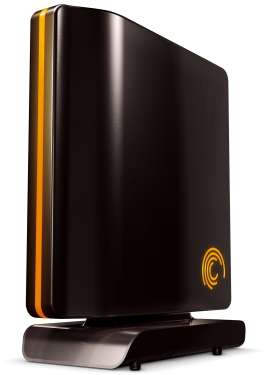
I can safely recommend the Seagate FreeAgent 750GB (below) – a virtually silent fan-free drive that doesn’t get scary hot when stressed, even in a non-airconditioned room. I bought the firewire and USB 2.0 version. Firewire cos I wanna save one of those precious USB ports on my laptop.
A cavernous hard drive is the engine of your digital-music-audiophile-rig (er, Digmar?). You can also use a network drive to drive your Digmar, which gives the added benefit of being able to access music from any networked-laptop or PC in the house.
What I don’t recommend is the chic-looking Lacie designer drive I bought a while back. My 750GB unit roars – and wheezes – like a small turbine engine, literally drowning the music at close quarters.
Step 2
Next is to consider what audio formats to rip your ceedees in. There are only two options for this if you care about audio quality: lossless or uncompressed audio format. Free Lossless Audio Codec (FLAC) or Apple Lossless Audio Codec (ALAC) are great, although purists say uncompressed formats like WAV or AIFF sound best. By best, it means not distinguishable from the original ceedee.
This is debatable, but even my not-so-good hearing seems to be able to discern the difference between both and preferred WAV. But WAV yields gigantic files. A CD of 12 songs can take about 500MB. A FLAC or ALAC compressed CD is less than half that.
And WAV can’t take cool album art such as the one below, as well as other meta data, at least in iTunes, which is a bummer.

The reason I mentioned choosing an audio compression format before discussing music playing applications and computers is because knowing which formats you want is necessary to determine how much storage you need.
Step 3
Hooking up your drive to a laptop or PC.
The good news is: Any laopok, old or second hand computer should suffice, so you can go cheap and still get high-end sound from your rig. But that’ll be for next instalment. Heh, I’m tired already writing up to here. How to build a Digmar will continue …



Hi, Cool post on g a no-compromise music player, part I at Techgoondu, I’m looking forward to reading more of your site.
Where’s part two?? 🙂
Thanks Albert for bringing up the DAC issue. I agree with Boon Kiat about external DACs. I use an M-Audio Firewire Solo and there’s an audible difference over my Rev A Intel iMac’s built-in sound chip. The problem with a lot of firewire audio interfaces is that the software driver can make a huge difference to the sound, although the actual processing takes place in the hardware.
QNAP eh? I must check it out. Thanks for the heads up Alfred.
I will be suggesting next the use of an external DAC. I am actually using one tethered to my PC via a USB-to-SPDIF connector. On sound quality, I grew up on LP records, which sounds far superior to CDs in general, and hence all that I am trying to do is just to close the gap between both my sources. Actually, I found PC audio to be better sounding than playback through CD players in the same price range. Not to mention far more convenient. It is the way to go – if we stick to uncompressed or lossless audio that is.
Actually, as a NAS fan, I’d suggest QNAP’s TurboNAS TS209. Duo drives with RAID1 so you don’t lose any of your precious music easily. Plus, it is a quiet unit, with a fan that doesn’t spin up most times and is quiet even when it does. Best of all, it’s fast, so you can stream movies as well. You can run iTunes server, watever else you want.. there’s a vibrant community with new plug-ins all the time. Go to http://www.qnap.com
If you’re an audiophile, the biggest problem is getting a really good digital player. PCs and Macs are not that impressive for their DAC playback.
But then again, there’s “audio-bliss” if you can’t hear the difference or go “spoil” your ears by listening to something superior.
Hey PC! The ibook will be perfect, since digital music streamed from the Mac platform is bit-accurate, unlike an untweaked XP system, which molests the music bits via a legacy audio driver called the K-Mixer. Vista is fine though.
Hi Steph, not knowing what ‘Aliens Ate My Buick’ shows you are very youthful 🙂 Oops, or does it show I am not very, er, youthful? This is actually an older, late 80s release from the grandfather of electro-music Thomas Dolby, who sang ‘She Blinded Me with Science’. Know that song? It has the line that every mad professor would wanna use on their cute lab assistants:
Good heavens Miss Sakamoto… you’re beautiful!
I don’t believe it!
There she goes again!
She’s tidied up, and I can’t find anything!
Steady lah, Boonie. You have given me an idea what to do with my 2 ibooks
My dad was thinking of getting the Buffalo (if I’m not wrong they are having some promotion going on right now), I should stop him before he does. And quick question – what on earth is “Aliens Ate My Buick”? (:
I second the Seagate 750GB external hard drive, which I bought on Boon Kiat’s recommendation. It’s the Seagate FreeAgent Pro, which is differentiated from the normal FreeAgent by the Firewire 400 port and eSATA. Super quiet, but Mac users will need to fiddle a bit to reformat it. Aside for the Lacie, which Boon Kiat recommends people stay away from, I’d also warn you away from Buffalo drives. I have a 500GB version that’s so noisy it’s ridiculous. I actually got woken up by it once or twice.