

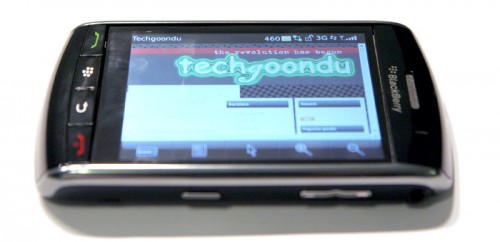
A touchscreen with a tactile keypress. That’s probably the most strikingly unique feature about RIM’s first touchscreen device – the BlackBerry Storm … aka its 9500 series.
The concept of its “SurePress” touchscreen certainly sounds good … on the screen – a capacitive touchscreen that you can not only tap, double tap, flick and drag your finger on, but also click on.
Click on a screen? Hmm. But will it make typing faster and easier?
While the idea of a clickable touchscreen sounds great, in reality, it didn’t quite click with me. The touch and tap aspects of the screen were great – you could highlight, copy and paste, swipe your finger to scroll etc. But when it came to typing, which I’d imagine you’d do a lot of on a messaging-centric device like a BlackBerry, that’s when the idea of a clicking screen started to come apart. First, it takes some effort to click the screen – more so than needed for a light tap on the touchscreen. And closer to the edges of the screen, the clicks needed even more effort. Will it have worked better if the screen required less effort to click? I think not.
So with all those milliseconds more that you need to click to type on the Storm’s screen, it simply ended up taking more effort – and slower than a plain old touchscreen. Sure it felt good to be able to click, but it didn’t add any speed or accuracy. And speedwise – it certainly was no where near typing on a qwerty ‘chicklet’ keypad like that on my Nokia E71 or the “normal” BlackBerries like the Curve or Bold. If you’re a real (not virtual touchscreen) qwerty keyboard user like me (Treo 650 to iPhone for a while and back to Nokia E71), forget about the Storm. There’s no way you could get used to this.
While I had no love for the keyboard, hiding the virtual keyboard really showed off the Storms big and bright 3.25″ screen.This is where it really goes one up on the competition. Sporting a HVGA+ (did they just invent this display “standard”?) 480 x 360 resolution screen like that on the BlackBerry Curve 8900 (which is higher than the 480 x 320 on the BlackBerry Bold) the large and high resolution screen made watching vodcasts and other videos truly practical on a screen this size.
You’d have thought that the combination of a nice big display and a touchscreen would have made surfing on the Storm a great experience. Unfortunately, the built-in browser is a little clunky and slow in rendering pages. I often ended up with “Requesting script” and “Running script” messages at the bottom of the browser – it just doesn’t seem to handle scripting well. However, it did make using Google Maps a joy – reiterating the fact that it was the slow browser that was spoiling a potentially good surfing experience.
Another area which the Storm could do with improvements is the lag in the operating system. It’s like the OS was trying to play catch up. Some times after unlocking the screen it will need an extra few seconds to get back into application where you last left it at. You still could get to your applications with a little patience, but you’d certainly not describe the experience as nippy.
But all this brickbats aside, this Storm must be every telco’s dream device. It does a great job with the multimedia experience (audio, video) – which suck up big packets of data – but it doesn’t let you do that for free as it does NOT have a Wifi connection. Probably one of the only messaging smartphones without a Wifi connection, this leaves you only with its HSDPA/3G connection for data access. Which means if you don’t have an unlimited data plan, or a boss paying for an unlimited data plan, you should just forget about it.
Even if I had an unlimited data plan, I ran into another problem. I get a spotty signal at some corners at home and the data connection sometimes switched back to a slower EDGE connection. Now what CAN you do about that? Ask the telco to put in another base station? But even with a good HSDPA connection, the connection’s still slower than Wifi – and why would you want a slower connection in a new phone?
And if you’re into video calling, you better take note that there’s no secondary camera (the one that faces you) on the Storm.
The few days with the Storm did make me miss the touchscreen experience. I’m convinced touchscreens are great – even many digicams come with touchscreen LCDs. Which brings me to the question of what makes it so difficult for all these non windows smartphone makers to come up with something with a touchscreen AND a real qwerty keyboard – something like an updated Treo 650? Now I’m imagining a BlackBerry Bold with a touchscreen – that would be close to perfection! HTC does churn out a nice range of smartphones with touchscreens and a qwerty keyboard but they run Windows Mobile and that’s another story for another day.
So after a few days with the BlackBerry Storm, on loan from the good people at RIM in Hong Kong, I concluded that I’m riding out this Storm.
No pricing available yet from the telcos here – they’re taking pre-orders for now. “Water goods” or parallel imports of the Storm are going for about HK$3,500-3,800.

I have took note of the amount of content you have got on your website and have found it quite informative
It’s only on pre-order from the local telcos … but the parallel importers here have it in the range of 449-487 USD.
Whats the price for a blackberry Storm 9500 model,
am presently in nigeria.
Thanks
lookforward to getting a reply soon