

Voice search for your phone – sounds good yeah?
I thought so too – so I tried out the latest Google Mobile App‘s voice search feature on my Nokia E71 (which means the S60 flavour of the app).
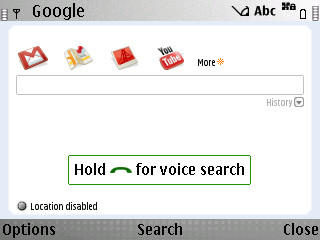
The app is basically kinda like a one-stop-shop to quickly link to and search through Google stuff, so you will need a data connection (wifi or cellphone network), and the other mobile apps (Gmail, Google Maps etc) loaded if you want to fire it up from the above home screen.
If you enable its location-based function, it’s supposed to yield more relevant results. But it didn’t seem to do anything for me in terms of returning more relevant search results so I shut that feature off.
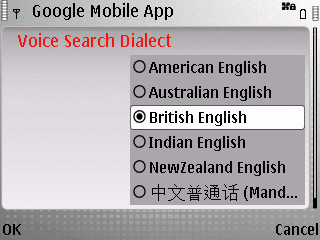
The above option is probably the most important setting to make your voice searches more accurate. But alas, while there’s “Indian English”, there’s no Singlish! How can like that? Die lah.
I mucked around with the British and American English options and found that you really do need to get your accents right. E.g. for word spelt “fast”, do you say ‘fahst’ or ‘f-ae-st’? And for Singaporeans with a mish-mash of accents, this might really get you thinking about your pronunciation.
Overall, the voice recognition was good – only if you spoke in phrases or sentences. Recognising single words remains a huge challenge and with all the exceptions in the English language, it really is no surprise that it choked over words like “flour”. I’ll go test it out some more on some American-English speaking friends but I’d imagine it will still struggle with single words.
Specifically on the E71, I think I’d still prefer to bash out my search term with the little keyboard. But on normal keypad-only phones, or for touchscreen phones with finicky virtual keyboards, voice search could be faster.
So if you have an Andriod (of course), BlackBerry, iPhone or S60 phone, give this app a go.
Oh, and when I said “techgoondu”, it gave me … “taekwondo”. So do you think it will recognise “shingz”? 🙂






I’m on firmware version 200.21.118 on the E71 and it worked fine for me.
And in case you need to find out what your firmware version on the E71 is, type *#0000# .
So far, the voice search app has been more of a novelty for me – it’s been easier to type out the search term on this phone.
it didnt work on my Nokia E71
the app wont even start ?!
i have the latest update on my nokia e71