• Samsung-Series-7-Ultra_top
    Four affordable – yet fast – ultrabooks for about S$1,500
  • nokia_lumia_925_top
    Nokia Lumia 925 goes metallic, still has great camera
  • BlackBerry Q10_01-top
    Hands on: BlackBerry Q10
  • Robin_Van_Persie_vs_Aston_Villa
    Commentary: MDA tells SingTel to show BPL matches on rival channels
  • GALAXY S 4 top
    What to buy: Samsung Galaxy S4, HTC One or Sony Xperia Z?
Latest Stories
Xbox One or PS4 not “next-gen” enough? Get a PC, maybe
Samsung sells 10 million Galaxy S4s in under a month
Asus PadFone Infinity hits stores in Singapore on June 1
WeChat tops download charts in Singapore after TV commercial debut


Parallels Desktop 6 hands-on

By:
4 Jul
2011
No Comments
 

Just bought a Mac but miss your old Windows PC’s functionalities? Want to run good old Microsoft Office but don’t want to fork out cash for a new version for the Mac?

Both scenarios my wife and I faced when we recently bought an iMac as a desktop computer to complement the Windows laptops we had at home. My wife loved the iMac’s clean design but had to get used to the Mac OS’ look and feel – plus a lot of her old programs had to be replaced by Mac versions.

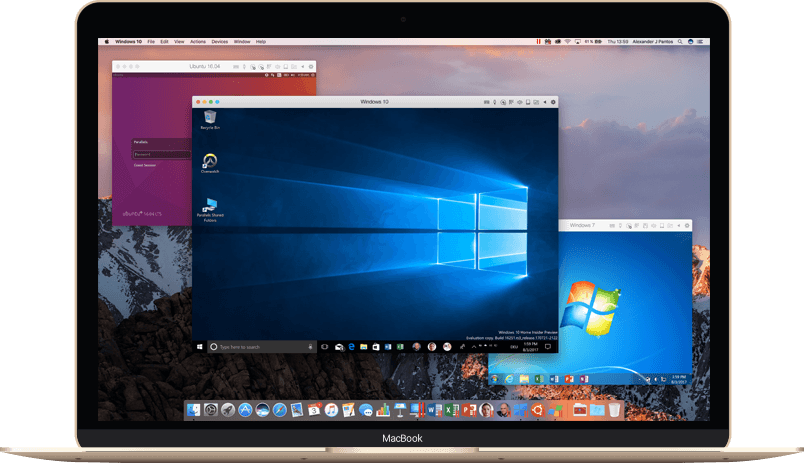
I had heard of Parallels’ virtual machine software before, but after several years of leaving the Mac platform, I had not kept up with virtual desktop applications until now. Thus when I installed Parallels Desktop 6 (PD6) a few weeks ago, I was pretty surprised by how far such “bridging” software have come in helping users enjoy the best of both Mac and Windows worlds.

 
Tagged in: Enterprise, PCs, Software, Apple iMac, Mac OS, Parallels Desktop 6, review, virtual machine, Windows 7,