By using this site, you agree to the Privacy Policy and Terms of Use.
Accept
TechgoonduTechgoonduTechgoondu
  • Audio-visual
  • Enterprise
    • Software
    • Cybersecurity
  • Gaming
  • Imaging
  • Internet
  • Media
  • Mobile
    • Cellphones
    • Tablets
  • PC
  • Telecom
Search
© 2023 Goondu Media Pte Ltd. All Rights Reserved.
Reading: Google voice search for your phone
Share
Font ResizerAa
TechgoonduTechgoondu
Font ResizerAa
  • Audio-visual
  • Enterprise
  • Gaming
  • Imaging
  • Internet
  • Media
  • Mobile
  • PC
  • Telecom
Search
  • Audio-visual
  • Enterprise
    • Software
    • Cybersecurity
  • Gaming
  • Imaging
  • Internet
  • Media
  • Mobile
    • Cellphones
    • Tablets
  • PC
  • Telecom
Follow US
© 2023 Goondu Media Pte Ltd. All Rights Reserved.
Techgoondu > Blog > Mobile > Cellphones > Google voice search for your phone
CellphonesMobileSoftware

Google voice search for your phone

limbeer
Last updated: June 13, 2014 at 5:06 PM
limbeer
Published: November 6, 2009
3 Min Read

Voice search for your phone – sounds good yeah?

I thought so too – so I tried out the latest Google Mobile App‘s voice search feature on my Nokia E71 (which means the S60 flavour of the app).
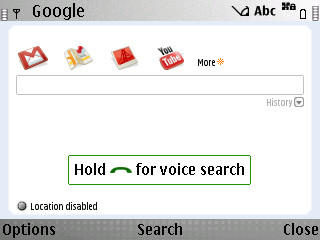
Google Mobile App - with voice search

The app is basically kinda like a one-stop-shop to quickly link to and search through Google stuff, so you will need a data connection (wifi or cellphone network), and the other mobile apps (Gmail, Google Maps etc) loaded if you want to fire it up from the above home screen.

If you enable its location-based function, it’s supposed to yield more relevant results. But it didn’t seem to do anything for me in terms of returning more relevant search results so I shut that feature off.
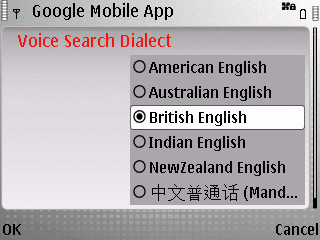
Choose your language - sorry, no Singlish

The above option is probably the most important setting to make your voice searches more accurate. But alas, while there’s “Indian English”, there’s no Singlish! How can like that? Die lah.

I mucked around with the British and American English options and found that you really do need to get your accents right. E.g. for word spelt “fast”, do you say ‘fahst’ or ‘f-ae-st’? And for Singaporeans with a mish-mash of accents, this might really get you thinking about your pronunciation.

Overall, the voice recognition was good – only if you spoke in phrases or sentences. Recognising single words remains a huge challenge and with all the exceptions in the English language, it really is no surprise that it choked over words like “flour”. I’ll go test it out some more on some American-English speaking friends but I’d imagine it will still struggle with single words.

Specifically on the E71, I think I’d still prefer to bash out my search term with the little keyboard. But on normal keypad-only phones, or for touchscreen phones with finicky virtual keyboards, voice search could be faster.

So if you have an Andriod (of course), BlackBerry, iPhone or S60 phone, give this app a go.

Oh, and when I said “techgoondu”, it gave me … “taekwondo”. So do you think it will recognise “shingz”? 🙂


APAC companies plagued by downtime on the cloud
Commentary: Singapore considers “do-not-call” list in overdue data protection law
Cybersecurity hygiene key to keeping cyber threats at bay, say experts
HTC Desire in Singapore end May 2010, goes for S$898
Holiday Gift Guide 2017: what to buy for a mobile warrior
TAGGED:BlackBerryGoogleGoogle AndroidiPhoneNokiasearch

Sign up for the TG newsletter

Never miss anything again. Get the latest news and analysis in your inbox.

By signing up, you agree to our Terms of Use and acknowledge the data practices in our Privacy Policy. You may unsubscribe at any time.
Share This Article
Facebook Whatsapp Whatsapp LinkedIn Copy Link Print
Bylimbeer
A former business and technology hack at The Business Times who's now based in Hong Kong and loves to come back for more good beers with fellow goondus.
Previous Article Android on a Sony Ericsson – the Xperia X10
Next Article Nokia E72 goes on sale
3 Comments
  • limbeer says:
    November 11, 2009 at 2:59 pm

    I’m on firmware version 200.21.118 on the E71 and it worked fine for me.

    And in case you need to find out what your firmware version on the E71 is, type *#0000# .

    So far, the voice search app has been more of a novelty for me – it’s been easier to type out the search term on this phone.

    Reply
  • bob says:
    November 9, 2009 at 9:01 pm

    it didnt work on my Nokia E71
    the app wont even start ?!
    i have the latest update on my nokia e71

    Reply

Leave a ReplyCancel reply

This site uses Akismet to reduce spam. Learn how your comment data is processed.

Stay Connected

FacebookLike
XFollow

Latest News

Sonos Beam Ultra review: Small in size but big for movie effects
Audio-visual
October 19, 2026
New Singapore virtual operator Swap Mobile promises new phone every six months
Mobile Telecom
October 17, 2026
From CPF Board to Seatrium, some Singapore organisations lead AI race with early success
Enterprise Software
October 16, 2026
Global smartphone market shrinks further, hit by worsening memory, component crisis
Cellphones Mobile
October 16, 2026

Techgoondu.com is published by Goondu Media Pte Ltd, a company registered and based in Singapore.

.

Started in June 2008 by technology journalists and ex-journalists in Singapore who share a common love for all things geeky and digital, the site now includes segments on personal computing, enterprise IT and Internet culture.


banner							
banner
Everyday DIY
PC needs fixing? Get your hands on with the latest tech tips
READ ON

banner							
banner
Leaders Q&A
What tomorrow looks like to those at the leading edge today
FIND OUT

banner							
banner
Advertise with us
Discover unique access and impact with TG custom content
SHOW ME


POWERED BY READYSPACE
The Techgoondu website is powered by and managed by Readyspace Web Hosting.

TechgoonduTechgoondu
© 2026 Goondu Media Pte Ltd. All Rights Reserved | Privacy | Terms of Use | Advertise | About Us | Contact
Follow Us!
Hear the signal from the noise. Essential tech analysis from our Reality Check newsletter.

Zero spam. Unsubscribe at any time.
Loading Comments...
Welcome Back!

Sign in to your account

Username or Email Address
Password

Lost your password?