
By using this site, you agree to the Privacy Policy and Terms of Use.
Accept
TechgoonduTechgoonduTechgoondu
  • Audio-visual
  • Enterprise
    • Software
    • Cybersecurity
  • Gaming
  • Imaging
  • Internet
  • Media
  • Mobile
    • Cellphones
    • Tablets
  • PC
  • Telecom
Search
© 2023 Goondu Media Pte Ltd. All Rights Reserved.
Reading: Chrome Beta lands in Singapore Android Market
Share
Font ResizerAa
TechgoonduTechgoondu
Font ResizerAa
  • Audio-visual
  • Enterprise
  • Gaming
  • Imaging
  • Internet
  • Media
  • Mobile
  • PC
  • Telecom
Search
  • Audio-visual
  • Enterprise
    • Software
    • Cybersecurity
  • Gaming
  • Imaging
  • Internet
  • Media
  • Mobile
    • Cellphones
    • Tablets
  • PC
  • Telecom
Follow US
© 2023 Goondu Media Pte Ltd. All Rights Reserved.
Techgoondu > Blog > Mobile > Cellphones > Chrome Beta lands in Singapore Android Market
CellphonesInternetMobileSoftwareTablets

Chrome Beta lands in Singapore Android Market

Aaron Tan
Last updated: June 13, 2014 at 5:05 PM
Aaron Tan
Published: February 27, 2012
2 Min Read
    

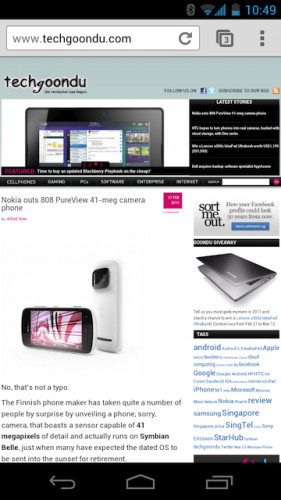
If you’re a proud owner of the newly-minted Samsung Galaxy Nexus, be sure to check out Google’s Chrome Beta browser that has finally made its way into the Android Market in Singapore.

Previously available only for users of Android 4.0 Ice Cream Sandwich devices in 12 countries including the United States, Japan and Korea, the browser beats rivals Dolphin HD and the stock Android browser hands-down in speed, with web pages and images loading faster than before. The speed boost is apparent even without running synthetic tests such as the SunSpider benchmark.

The snappy browser also includes a link preview feature that zooms in on hyperlinks to make it easy to select the right one you wish to click on among others. The mobile browser also shares the same features as its desktop brother, including the incognito mode for private browsing.

A nifty tab browsing feature also lets you swipe across the screen to switch tabs. Or, view all your browser tabs at once in a stack view, which allows you to close tabs by simply swiping the stacks sideways.

Plus, if you sign in to Chrome on both mobile and desktop versions of the browser, you can access the tabs that are left open on your desktop, and pick up from where you left off on the phone. The mobile browser also offers autocomplete suggestions for websites that you browse frequently on the desktop.

Outdoor augmented reality experience at Marina Bay among new 5G projects in Singapore
Singapore expands AI assurance pilot to test AI agents, detect prompt injections
How rugged mobile devices are empowering hybrid workstyles
iPhone 3G woes mount
Binance to cease trades in Singapore, focus on blockchain innovation

Sign up for the TG newsletter

Never miss anything again. Get the latest news and analysis in your inbox.

By signing up, you agree to our Terms of Use and acknowledge the data practices in our Privacy Policy. You may unsubscribe at any time.
Share This Article
Facebook Whatsapp Whatsapp LinkedIn Copy Link Print
Previous Article Nokia outs 808 PureView 41-meg camera phone
Next Article Commentary: IDA pushes for faster fibre turn-on
Leave a Comment

Leave a ReplyCancel reply

This site uses Akismet to reduce spam. Learn how your comment data is processed.

Stay Connected

FacebookLike
XFollow

Latest News

Singapore proposes global standard to test generative AI systems to build trust
Enterprise
April 22, 2026
New Apple CEO: Can John Ternus create next iPhone?
Internet Mobile PC
April 21, 2026
Razer Pro Type Ergo review: Well-built keyboard offers comfort, flexibility
PC
April 20, 2026
DJI Pocket 4 review: Refinement of a tested camera system
Imaging
April 17, 2026

Techgoondu.com is published by Goondu Media Pte Ltd, a company registered and based in Singapore.

.

Started in June 2008 by technology journalists and ex-journalists in Singapore who share a common love for all things geeky and digital, the site now includes segments on personal computing, enterprise IT and Internet culture.


banner							
banner
Everyday DIY
PC needs fixing? Get your hands on with the latest tech tips
READ ON

banner							
banner
Leaders Q&A
What tomorrow looks like to those at the leading edge today
FIND OUT

banner							
banner
Advertise with us
Discover unique access and impact with TG custom content
SHOW ME


POWERED BY READYSPACE
The Techgoondu website is powered by and managed by Readyspace Web Hosting.

TechgoonduTechgoondu
© 2026 Goondu Media Pte Ltd. All Rights Reserved | Privacy | Terms of Use | Advertise | About Us | Contact
Follow Us!
Hear the signal from the noise. Essential tech analysis from our Reality Check newsletter.

Zero spam. Unsubscribe at any time.
 

Loading Comments...
 

    Welcome Back!

    Sign in to your account

    Username or Email Address
    Password

    Lost your password?