

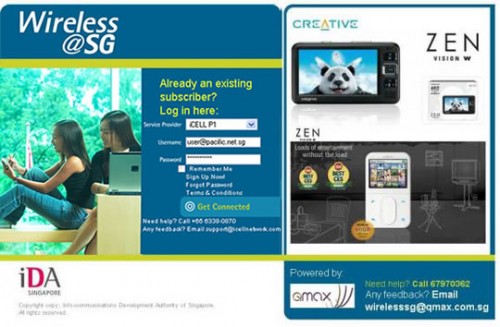
Hard to log in. Keep getting disconnected.
If those problems have kept you from surfing the Web with Wireless@SG, you’ll be happy to hear that the free Wi-Fi hotspot service islandwide is now going to be a breeze to use.
With a new secure sign-on system announced today, you will only need to sign in once on your PC or phone and never have to do it again when you next visit a Wireless@SG hotspot.
PC users simply have to download and install the Wireless@SG Connect app on their laptops or netbooks. The same for iPhone and Windows Mobile users, though Android and Blackberry fans will have to manually key in their settings. More details here.
In all cases, this is a one-off process – much better than having to log in every time you log on.
The improved ease of use, which will be rolled out on all hotspots by September 2010, does away with one of the biggest problems with Wireless@SG – logging in.
The so-called Seamless and Secure Access (SSA) feature could also remove another thorny problem – frequent disconnections.
A big headache for users, this often has to do with hotspots overlapping one another. Essentially, your PC thinks two Wireless@SG access points (AP), say, SingTel’s at Burger King and M1/Qala’s at McDonald’s next door are on the same network and keeps handing you from one AP to the next.
Each time this happens, you are asked to re-login because the two networks are run by different operators. Thus, with an auto-login feature, you will at least be spared the trouble of being logged off and asked to sign in again every other minute.
From testing the software and service at today’s demo at City Mall, things seem straightforward enough for PC users as well as iPhone and Windows Mobile users. They only need to set up their username and password on the software to be installed on their device, and remember to log on to an AP called Wireless@SGx instead of Wireless@SG.
However, my Google Nexus One, running Android 2.1, took a bit of setting up. It was not the phone that caused the problems with the manual setup. It was SingTel, which insists on making you add a long string of characters behind your usual username, in the name of a more secure login.
If you are trying to key in this username on a phone, it’s best you surf to the SingTel site (possibly using 3G) to generate and copy the exact username, then paste it into your configuration screen. Once done, you will automatically log in to Wireless@SG every time you hit the hotspot.
Fortunately, the other two Wireless@SG operators – iCell Network and M1 – spare us from this trouble. You only have to key in your regular username and password to get going.
Since its inception, I’ve been a fan of Wireless@SG and I’m happy with this development, which shows that this is a project that the Singapore government has not forgotten after unveiling it in 2006 (if only all projects had a good follow-through like this).
Sure, I now use 3.5G on my phone because it’s pretty fast, seamless and affordable. But there are many times I still use Wireless@SG. At cafes, I’d rather log in with Wi-Fi than tether my phone and suck up my laptop’s battery.
And what about people who do not need or want to use 3.5G, like the school kids at the libraries, who get to surf for free on their laptops? Wireless@SG fits the bill.
Finally, let’s not forget how Wireless@SG got people hooked on this habit of surfing on the go. Like a “free trial” of paid 3.5G services, it gave people a taste of mobile surfing that many never turned back from. At its original launch, it also forced telcos to rethink their 3.5G prices for the first time, which eventually led to today’s affordable levels.
Yet, for so long, many users have bitched and complained about Wireless@SG, one of Singapore’s best telecom policies. To me, it’s free, it’s got people surfing on the go, and it’s moved things in the market. Now, it’s also easy to use.





The very first thing when you login via wireless sg is you see the advertising flashes on this Telco site. Is this not taking advantage ? every one whom uses the telco site to log in cannot avoid noticing the ads ? so is this not taking advantage of people whom have to go thru that entrance. but this entrance is paid for by the GOV for public to access. And this contract service providers are Paid big sum by the GOV to provide the service. Like Singtel, the moment you logon to wireless SG at their site, you see their promotion for Android phones ?
Is that not free ads while being paid to provide the platform to enable free wireless SG access sponsored by the GOV ?
a bit strange here.
Having WirelessSG provided by the same Telcos whom sells paid package have conflict of interest. The free wireless SG should be contracted to neutral companies. This neutral companies will then introduces enhancement to force telcos to give even better services. Its also obvious that, under the expense of the GOVERMENT fund, this telco are doing free advertising of their so call value added services. They tend to make it not so easy for users to log in. The inconvinience force users to look at the paid package which are offered by this very same TELCOs. Therefore, there is a a conflict of interest there. The telcos operation the wireless SG sponsored and paid by the Goverment are riding on it to benefit their own sales.
The free services wireless SG contract should have been given to contractors not currently offering paid internet packages in that way – there can be real competition and force the Telcos to provided even better services and price.
I am using the Samsung Galaxy Ace. Andbi just have no idea how to log in as it has 3 blanks, “Identity”, “Anonymous Identity”, and “Password”. However I dunno which to fill what…
same problem
I m using a samsung galaxy 3 phone. I have tried to connect to wireless sgx at public places like CC, it works for a few days but not anymore. Not sure what i did, it cannot surf net though it is connected to wireless sg.
I m also unable to auto connect to wireless sgx server even after i configured my phone with the correct username and password. Not sure why.
Is there anyone with this problem?
How can I access it if I forgot my user ID and password?
I can’t created new account using my FIN Number, and say this FIN is already registered. How can I reaccess it? thanks.
hi there, i’m using a HTC Legend running on Android 2.1, i’m having trouble configuring the SSA…
When i tried to add the network, under the Security i don’t see WPA Enterprise, only WPA PSK, and another 802.1x Enterprise.
did you have the same problem?
the clearest local story about the Wireless@SG single sign on news I have read
I have try to Wireless@SG Connect apps on my laptop, but it look like the apps do not support on my laptop os windows 7 64bits…. do any one know any ways to use the apps for windows 7 64 bits?
Agree that it does solve the problem of logging in and switching access point when you are near 2 hotspot from 2 different operator. They should have done this 3 years ago. I’m glad they finally solved this problem.
But this solution still does not solve the instability and frequent disconnection issue. In fact, my friend was trying it out yesterday night and couldn’t login. In the end, he switched back to using his 3G BBOM.
It is a good move by IDA. But I personally feels that they need to do more before I dare to step out of my house without my 3G modem.
In total agreement, Alf.
Wireless@SG has been one of the best tech policies that IDA got right, and you nailed it.
I don’t understand about the bitching in the comments section in ST on this story.
Government give free, complain. Make it easier, complain.
Unless it’s not about IDA policies, but unhappiness about our government in general. If it’s politics, it’s a separate issue (go to TOC or TR, and I agree with quite a bit said there), but give credit where credit is due.
Sure there’s always room for improvement, there’s always government wastage and fat, and from the grapevine there’s some top folks in IDA who are disliked by the staff.
But IDA, in spite of the handicap of being forced to change it’s top brass every few years, actually does some policy work well.
This cannot be said of other agencies, however.