By using this site, you agree to the Privacy Policy and Terms of Use.
Accept
TechgoonduTechgoonduTechgoondu
  • Audio-visual
  • Enterprise
    • Software
    • Cybersecurity
  • Gaming
  • Imaging
  • Internet
  • Media
  • Mobile
    • Cellphones
    • Tablets
  • PC
  • Telecom
Search
© 2023 Goondu Media Pte Ltd. All Rights Reserved.
Reading: Choosing a Windows 8 tablet for your business
Share
Font ResizerAa
TechgoonduTechgoondu
Font ResizerAa
  • Audio-visual
  • Enterprise
  • Gaming
  • Imaging
  • Internet
  • Media
  • Mobile
  • PC
  • Telecom
Search
  • Audio-visual
  • Enterprise
    • Software
    • Cybersecurity
  • Gaming
  • Imaging
  • Internet
  • Media
  • Mobile
    • Cellphones
    • Tablets
  • PC
  • Telecom
Follow US
© 2023 Goondu Media Pte Ltd. All Rights Reserved.
Techgoondu > Blog > Mobile > Tablets > Choosing a Windows 8 tablet for your business
EnterpriseMobileSoftwareTabletsUncategorized

Choosing a Windows 8 tablet for your business

Aaron Tan
Last updated: June 13, 2014 at 4:59 PM
Aaron Tan
Published: December 16, 2012
3 Min Read

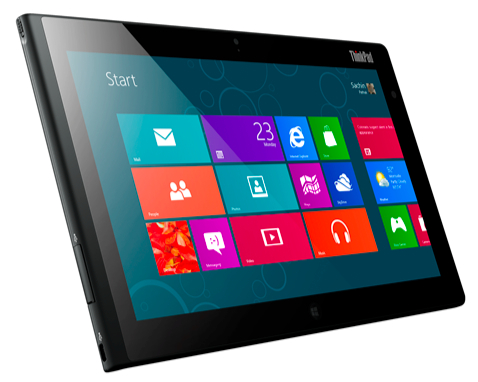
Businesses have typically been slow to adopt any new version of Windows, and the newly-minted Windows 8 is no exception.

To boost demand for Windows 8 tablets among corporations, Microsoft has put together a quick guide to help businesses decide on the kind of Windows 8 tablet to buy.

Windows 8 tablets come in a variety of flavours. Some can be docked onto a keyboard, while hybrid models can be rotated around their hinges. They are also powered by different processors: Atom and Core-based processors from Intel, and ARM-based processors from the likes of Nvidia and Texas Instruments.

However, only Atom and Core-based Windows 8 tablets can run older Windows applications. ARM-based tablets running Windows RT will only support Windows 8 apps from the Windows Store.

So, with that in mind, here are the considerations suggested by Microsoft when choosing a Windows 8 tablet for your business:

Mobility: If your employees are highly mobile and require devices with a good battery life, go for Windows 8 slates with Intel Atom processors or Windows RT tablets. These tablets are built to consume minimal power and should last a day or two on a single charge.

Workload. Crunching data, rendering images and other complex computing jobs require more powerful tablets powered by Intel Core processors, while basic tasks such as reading e-mail, web browsing and running web apps will be well taken care of by Atom-based and Windows RT tablets.

Apps. If you rely on older Windows applications, you need a Windows 8 tablet powered by an Intel Core or Atom processor. Unless you intend to build Windows RT apps from scratch to meet specific business needs, rule out Windows RT tablets for now.

Corporate access. Are employees connecting to the corporate network via a virtual private network (VPN)? If the answer is yes, they will need a Windows 8 tablet powered by Intel’s Core and Atom processors. Or, use the DirectAccess feature on tablets with Windows 8 Enterprise to allow access to corporate resources without going through a VPN.

Always On. If you depend on apps that continue to receive information even when the device is switched off, choose Windows 8 tablets with Intel Atom processors or Windows RT tablets that support the Connected Standby feature.

Manageability. If the IT folks want full control over employee devices, opt for Windows 8 tablets with Intel Core or Intel Atom processors. These tablets can be managed using Active Directory, Group Policy, and System Center Configuration Manager, allowing granular control of devices, including the ability to push out new versions of apps.

Also, in all versions of Windows 8, IT admins can mandate basic security settings for tablets that connect to corporate networks.

Healthcare data is prime target in cyberattacks: Rubrik
M1 launches first commercial nationwide IoT network in SE Asia
HP Singapore to offer refunds for TouchPad
Trust no one, because perimeter defences can’t keep out cyberattacks
Asus ExpertBook P3 review: Built for the business user

Sign up for the TG newsletter

Never miss anything again. Get the latest news and analysis in your inbox.

By signing up, you agree to our Terms of Use and acknowledge the data practices in our Privacy Policy. You may unsubscribe at any time.
Share This Article
Facebook Whatsapp Whatsapp LinkedIn Copy Link Print
Previous Article Epson Singapore shows off interactive office projectors
Next Article Scan, print and copy on the go with HP’s mobile all-in-one printer
Leave a Comment

Leave a ReplyCancel reply

This site uses Akismet to reduce spam. Learn how your comment data is processed.

Stay Connected

FacebookLike
XFollow

Latest News

Intel Core Ultra Series 3 chips bring “real” gaming to thin and light laptops
Gaming PC
February 13, 2026
Asia-Pacific users shop with AI but trust gap slows checkout: Visa
Enterprise Internet
February 12, 2026
Sony Alpha 7 V review: Better sensor for action, stage photography
Imaging
February 11, 2026
Q&A: Heterogenous, open systems key to AI’s next big step: AMD
Enterprise
February 11, 2026

Techgoondu.com is published by Goondu Media Pte Ltd, a company registered and based in Singapore.

.

Started in June 2008 by technology journalists and ex-journalists in Singapore who share a common love for all things geeky and digital, the site now includes segments on personal computing, enterprise IT and Internet culture.


banner							
banner
Everyday DIY
PC needs fixing? Get your hands on with the latest tech tips
READ ON

banner							
banner
Leaders Q&A
What tomorrow looks like to those at the leading edge today
FIND OUT

banner							
banner
Advertise with us
Discover unique access and impact with TG custom content
SHOW ME


POWERED BY READYSPACE
The Techgoondu website is powered by and managed by Readyspace Web Hosting.

TechgoonduTechgoondu
© 2026 Goondu Media Pte Ltd. All Rights Reserved | Privacy | Terms of Use | Advertise | About Us | Contact
Follow Us!
Never miss anything again. Get the latest news and analysis in your inbox.

Zero spam, Unsubscribe at any time.
 

Loading Comments...
 

    Welcome Back!

    Sign in to your account

    Username or Email Address
    Password

    Lost your password?