By using this site, you agree to the Privacy Policy and Terms of Use.
Accept
TechgoonduTechgoonduTechgoondu
  • Audio-visual
  • Enterprise
    • Software
    • Cybersecurity
  • Gaming
  • Imaging
  • Internet
  • Media
  • Mobile
    • Cellphones
    • Tablets
  • PC
  • Telecom
Search
© 2023 Goondu Media Pte Ltd. All Rights Reserved.
Reading: Download Netflix shows onto an SD card and binge during Chinese New Year
Share
Font ResizerAa
TechgoonduTechgoondu
Font ResizerAa
  • Audio-visual
  • Enterprise
  • Gaming
  • Imaging
  • Internet
  • Media
  • Mobile
  • PC
  • Telecom
Search
  • Audio-visual
  • Enterprise
    • Software
    • Cybersecurity
  • Gaming
  • Imaging
  • Internet
  • Media
  • Mobile
    • Cellphones
    • Tablets
  • PC
  • Telecom
Follow US
© 2023 Goondu Media Pte Ltd. All Rights Reserved.
Techgoondu > Blog > Audio-visual > Download Netflix shows onto an SD card and binge during Chinese New Year
Audio-visualMedia

Download Netflix shows onto an SD card and binge during Chinese New Year

Alfred Siew
Last updated: January 27, 2017 at 4:36 PM
Alfred Siew
Published: January 27, 2017
2 Min Read
SCREENSHOT: Alfred Siew

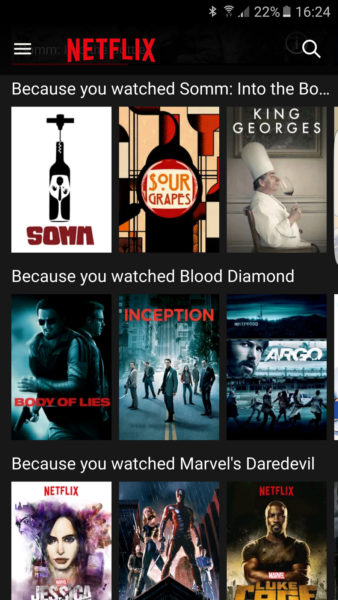
If the upcoming Chinese New Year long weekend means you’re stuck with re-runs of old Jackie Chan movies on cable or boring countdown shows on free-to-air TV, fret not. You can bring your Netflix with you – even when there’s no Internet access.

The video streaming service now lets you save your favourite movies onto an SD card that is plugged into your phone or tablet, enabling you to save as many shows as you like.

Even if you are stuck at a relative’s place, it’s easy to pop in a memory card full of videos and start your binge. If that’s a little anti-social, you can also sneak a quick catch-up in a taxi while travelling in between places to visit.

Netflix had finally allowed users to download the videos onto a phone or tablet for offline viewing last month. It’s taken a few more weeks for it to now enable this feature for your SD card as well.

This means you don’t have to worry about running out of space when downloading entire seasons of, say, The OA, Narcos and Gilmore Girls. They take up space fast unless your mobile device has enough capacity.

An episode of Narcos took up 249MB on an Android phone when we tried downloading it last month. The 10 episodes in Season Two of the drug and crime series are expected to take up more than 2GB on a mobile device.

SCREENSHOT: Alfred Siew

Now that won’t be a problem if you have SD cards lying around. Ready to get started? Here’s how it works:

1. From the Netflix app, tap the Menu icon.

2. Scroll down and tap App Settings.

3. Under the Downloads heading, tap Download Location.

4. Select where you would like to store your downloads. This will change the storage location of future downloads. Titles you have already downloaded will remain where they are.


Nothing Ear (3) review: Well made but value depends on your priorities
TCL P735 review: An interesting way to watch your shows with Google TV
Hands on: Sony Xperia Touch is cute but costly
Nexus 7 finally comes to Singapore, costs S$399 for 16GB version
Geek Buy #1: AE Aego M speakers
TAGGED:binge watchingChinese New YeardiyNetflixNetflix downloadSDcardSingaporevideo streaming

Sign up for the TG newsletter

Never miss anything again. Get the latest news and analysis in your inbox.

By signing up, you agree to our Terms of Use and acknowledge the data practices in our Privacy Policy. You may unsubscribe at any time.
Share This Article
Facebook Whatsapp Whatsapp LinkedIn Copy Link Print
Avatar photo
ByAlfred Siew
Follow:
Alfred is a writer, speaker and media instructor who has covered the telecom, media and technology scene for more than 20 years. Previously the technology correspondent for The Straits Times, he now edits the Techgoondu.com blog and runs his own technology and media consultancy.
Previous Article Goodbye 3D and curved TVs, you’re not missed
Next Article Goondu review: Jabra Elite Sport are nice – once paired
Leave a Comment

Leave a ReplyCancel reply

This site uses Akismet to reduce spam. Learn how your comment data is processed.

Stay Connected

FacebookLike
XFollow

Latest News

Sonos Play review: Handy portable speaker for easy listening
Audio-visual
May 23, 2026
At Dell World 2026, AI shifts from software layer to core infrastructure
Enterprise
May 22, 2026
Anker unveils soundcore Liberty 5 Pro Series with Anker’s first neural-net chip
Audio-visual
May 22, 2026
ATxSummit: In Singapore, a tough balancing act in the rush to lead in AI
Enterprise Internet
May 21, 2026

Techgoondu.com is published by Goondu Media Pte Ltd, a company registered and based in Singapore.

.

Started in June 2008 by technology journalists and ex-journalists in Singapore who share a common love for all things geeky and digital, the site now includes segments on personal computing, enterprise IT and Internet culture.


banner							
banner
Everyday DIY
PC needs fixing? Get your hands on with the latest tech tips
READ ON

banner							
banner
Leaders Q&A
What tomorrow looks like to those at the leading edge today
FIND OUT

banner							
banner
Advertise with us
Discover unique access and impact with TG custom content
SHOW ME


POWERED BY READYSPACE
The Techgoondu website is powered by and managed by Readyspace Web Hosting.

TechgoonduTechgoondu
© 2026 Goondu Media Pte Ltd. All Rights Reserved | Privacy | Terms of Use | Advertise | About Us | Contact
Follow Us!
Hear the signal from the noise. Essential tech analysis from our Reality Check newsletter.

Zero spam. Unsubscribe at any time.

Loading Comments...

    Welcome Back!

    Sign in to your account

    Username or Email Address
    Password

    Lost your password?