By using this site, you agree to the Privacy Policy and Terms of Use.
Accept
TechgoonduTechgoonduTechgoondu
  • Audio-visual
  • Enterprise
    • Software
    • Cybersecurity
  • Gaming
  • Imaging
  • Internet
  • Media
  • Mobile
    • Cellphones
    • Tablets
  • PC
  • Telecom
Search
© 2023 Goondu Media Pte Ltd. All Rights Reserved.
Reading: Seagate Wireless Plus offers Wi-Fi storage, Central promises easy backup
Share
Font ResizerAa
TechgoonduTechgoondu
Font ResizerAa
  • Audio-visual
  • Enterprise
  • Gaming
  • Imaging
  • Internet
  • Media
  • Mobile
  • PC
  • Telecom
Search
  • Audio-visual
  • Enterprise
    • Software
    • Cybersecurity
  • Gaming
  • Imaging
  • Internet
  • Media
  • Mobile
    • Cellphones
    • Tablets
  • PC
  • Telecom
Follow US
© 2023 Goondu Media Pte Ltd. All Rights Reserved.
Techgoondu > Blog > PC > Seagate Wireless Plus offers Wi-Fi storage, Central promises easy backup
PC

Seagate Wireless Plus offers Wi-Fi storage, Central promises easy backup

Zen Soo
Last updated: April 9, 2013 at 11:29 AM
Zen Soo
Published: April 9, 2013
3 Min Read

wireless-plus-hero-right-hi-res-4975x4975
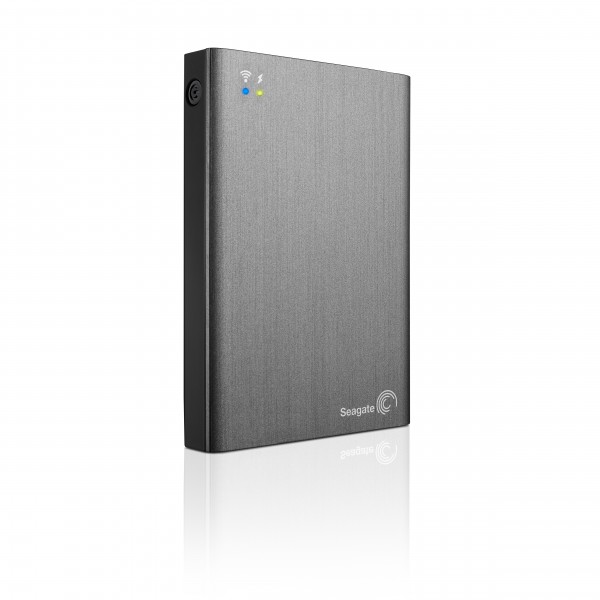
The Seagate Wireless Plus

If you think that the best way to hook up to an external hard disk is simply to connect it to your PC via USB, there’s actually a lot more you can do with the storage devices these days.

Seagate recently started shipping in Singapore its Seagate Wireless Plus portable hard disk that connects with phones over Wi-Fi, along with the Seagate Central backup device that comes with smart TV apps. 

The S$299 Wireless Plus has an integrated 1TB drive that holds up to 500 HD movies and allows up to eight tablets and mobile phones to connect to it at any one time. Accessed through the Seagate Media app, the battery-powered Wireless Plus will work with just about any device that can connect to a Wi-Fi network.

What sets the Wireless Plus apart from other mobile storage devices is that it creates its own secure, wireless network, allowing you to access the storage device practically everywhere – on a flight, on the road, and even on top of a mountain. This eliminates the need for a data plan or an external Wi-Fi network in order to access the content.

A new option also allows users to wirelessly upload content to the drive through the Seagate Media app. Now, users can take a HD video and back it up to the Wireless Plus immediately after taking it.
Central-Right-Hi-Res

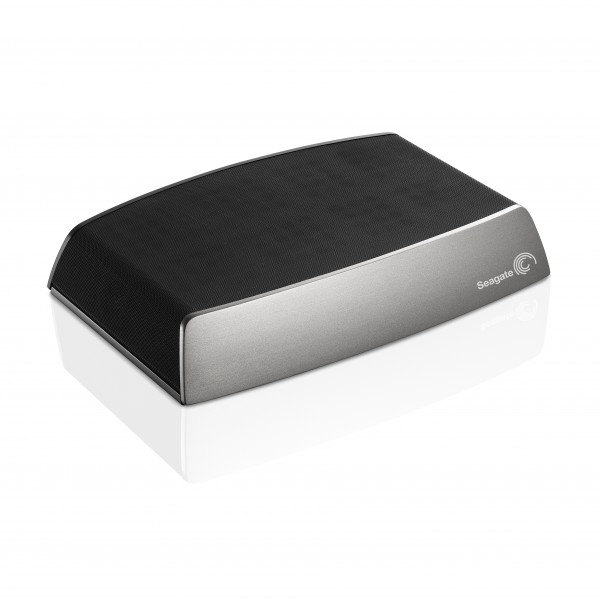
The Seagate Central

The other device, the Seagate Central, is the first storage device to feature a Smart TV app for access to files on the TV screen, according to Seagate. It functions as a centralised backup for each computer in the home, even if there are mixed platforms such as Windows or Mac.

The Seagate Central is also able to backup photos and videos directly from Facebook. Plus, it enables users to stream media directly from the drive with free apps for Samsung Smart TVs as well as Android, Apple iOS devices and Amazon Kindle HD.

Available in Singapore from May, the 2TB Central would set you back by S$239. Those who want more storage can settle on a 3TB version (S$309) or 4TB version (S$369).

Goondu review: Asus ZenBook Pro Duo UX581 promises easier multi-taking with two screens
Hands on: Asus Transformer Book Trio and other gizmos hitting Singapore
HP to split into two companies, raising questions
Geek Buy: Logitech K350 wireless keyboard
What you need to play Grand Theft Auto VI: Gear up or zen out
TAGGED:Centralexternal hard diskSeagateWi-FiWireless Plus

Sign up for the TG newsletter

Never miss anything again. Get the latest news and analysis in your inbox.

By signing up, you agree to our Terms of Use and acknowledge the data practices in our Privacy Policy. You may unsubscribe at any time.
Share This Article
Facebook Whatsapp Whatsapp LinkedIn Copy Link Print
Previous Article Fuji Xerox aims for top market share spot in Myanmar
Next Article Hands on: Samsung Galaxy S4 is not as “plasticky” as thought
Leave a Comment

Leave a Reply Cancel reply

This site uses Akismet to reduce spam. Learn how your comment data is processed.

Stay Connected

FacebookLike
XFollow

Latest News

Lenovo Yoga Slim 7i Ultra review: Power-packed laptop weighing under 1kg
PC
November 15, 2026
Jensen is out but Nvidia chips still hard to control until the rules catch up
Enterprise
November 13, 2026
New Equinix SG6 data centre in Singapore shows off energy efficiency in the tropics
Enterprise
November 12, 2026
How Jensen Huang affair could change Nvidia, the US$5 trillion “sole proprietorship”
Enterprise
November 10, 2026

Techgoondu.com is published by Goondu Media Pte Ltd, a company registered and based in Singapore.

.

Started in June 2008 by technology journalists and ex-journalists in Singapore who share a common love for all things geeky and digital, the site now includes segments on personal computing, enterprise IT and Internet culture.


							banner							
							banner
Everyday DIY
PC needs fixing? Get your hands on with the latest tech tips
READ ON

							banner							
							banner
Leaders Q&A
What tomorrow looks like to those at the leading edge today
FIND OUT

							banner							
							banner
Advertise with us
Discover unique access and impact with TG custom content
SHOW ME


POWERED BY READYSPACE
The Techgoondu website is powered by and managed by Readyspace Web Hosting.

TechgoonduTechgoondu
© 2026 Goondu Media Pte Ltd. All Rights Reserved | Privacy | Terms of Use | Advertise | About Us | Contact
Follow Us!
Hear the signal from the noise. Essential tech analysis from our Reality Check newsletter.

Zero spam. Unsubscribe at any time.
Welcome Back!

Sign in to your account

Username or Email Address
Password

Lost your password?